How to Size Backup Power: A Watt-Hour Worksheet for Outages
This post may contain affiliate links, full disclosure here.
Quick answer: list the devices you need during an outage, find each one’s wattage, multiply by the hours it will run each day, and add the results to get daily watt-hours. Add a margin of about 20 to 25 percent for inverter losses and surprises, then multiply by the number of days you want to cover. Compare that total with the watt-hour capacity of a battery, and compare your largest running and surge wattage with the output rating of any inverter or generator. Size to the list, not the sales page.
Backup power shopping usually starts in the wrong place. A product page lists a big number, and the buyer works backward to imagine what it might run. The result is often a battery too small for the refrigerator or a generator far larger than a small apartment needs.
This worksheet reverses the order. It starts with the devices that matter in an outage and ends with a number you can compare against any battery, power station or generator. It is a companion to our emergency power guide, which covers the equipment choices and safety rules in full.

Watts, Watt-Hours and Amps in Plain Terms
Three units come up again and again.
Watts measure the rate at which a device uses power at a given moment. A 10-watt LED bulb uses 10 watts while it is on.
Watt-hours measure energy used over time. That same 10-watt bulb running for 5 hours uses 50 watt-hours. A kilowatt-hour, the unit on a utility bill, is 1,000 watt-hours.
Amps measure electrical current. In a U.S. home, standard outlets supply about 120 volts, and multiplying volts by amps gives an approximate wattage. A device labeled 1.5 amps at 120 volts draws up to about 180 watts. Labels usually show the maximum, so the device may use less most of the time.
Kilowatts for larger systems
Home battery backup systems and standby generators are usually rated in kilowatts (kW) for power output and kilowatt-hours (kWh) for storage. One kilowatt is 1,000 watts. A worksheet total of 4,600 watt-hours is the same as 4.6 kilowatt-hours, which makes it easy to compare against those spec sheets.
Batteries are rated in two ways. Large batteries and power stations usually list watt-hours directly. Phone power banks often list milliamp-hours instead, measured at the internal cell voltage. To convert, multiply the milliamp-hour figure by the cell voltage, usually about 3.6 to 3.7 volts, and divide by 1,000. A 20,000 mAh power bank at 3.7 volts holds about 74 watt-hours before conversion losses.

Step 1: List What Truly Needs Power
Begin with needs, then add wants if the budget allows. Ready.gov’s power outage guidance focuses on a few priorities: medical needs, keeping food safe, communication and light, and staying at a safe temperature.
Group your list in three tiers:
- Tier 1, must run: medical devices, phones, a radio, essential lighting
- Tier 2, should run: refrigerator or freezer, internet router, a fan or heater blower, a sump pump if flooding is a risk
- Tier 3, nice to have: television, laptop for entertainment, coffee maker, microwave
The tiers matter later. If the total is too high for your budget or space, you trim from the bottom tier first.

Step 2: Find Each Device's Wattage
There are four common ways to find out how much power a device uses, from least to most accurate.
Read the label or adapter
Most appliances have a nameplate or sticker listing watts, or volts and amps. Power adapters for phones, laptops and medical devices print their output. These numbers are maximums, which makes them useful for a conservative estimate.
Check the EnergyGuide label
Many refrigerators, freezers and other major appliances carry the yellow EnergyGuide label required by the Federal Trade Commission. It lists estimated yearly electricity use in kilowatt-hours. Dividing that number by 365 gives a rough daily figure in kilowatt-hours; multiply by 1,000 for watt-hours. Real-world use can differ depending on room temperature, how full the appliance is and how often it is opened.
Look up the manual
Manufacturers of medical devices and larger appliances often publish power consumption in the manual or on a support page. CPAP makers, for instance, typically list power use with and without the heated humidifier, which can make a large difference.
Measure it
A plug-in electricity usage meter, sold at hardware stores, sits between the outlet and the device and records actual watts and cumulative kilowatt-hours. Leaving a refrigerator plugged into one for 24 hours gives a far better daily figure than any label, because it captures how often the compressor cycles.

Kitchen Appliances, Air Conditioners and Other Big Loads
A few appliances decide whether a small battery is enough or whether you need a much larger system. Virginia Cooperative Extension, in a fact sheet developed with the U.S. Department of Energy’s Building Science program, lists typical nameplate wattages for common household appliances. A selection:
| Appliance | Typical nameplate watts |
|---|---|
| Coffee maker | 900 to 1,200 |
| Microwave oven | 750 to 1,100 |
| Toaster | 800 to 1,400 |
| Portable heater | 750 to 1,500 |
| Dehumidifier | 785 |
| Window fan | 55 to 250 |
| Furnace fan | 750 |
| Refrigerator (frost-free, 16 cubic feet) | 725 |
| Deep well water pump | 250 to 1,100 |
| Water heater (40 gallon, electric) | 4,500 to 5,500 |
Kitchen appliances
Kitchen appliances that heat, such as coffee makers, toasters and microwaves, draw a lot of power but only for minutes at a time. A 1,000-watt microwave used for 10 minutes uses only about 167 watt-hours, but it needs a battery or generator that can deliver 1,000 watts or more at once. Plan them as short bursts, run one at a time, and never while another big load is starting.
Air conditioners
An air conditioner is often the single largest load in a home, and it runs for hours on hot days. Window and portable units vary widely by size, so read the nameplate or manual for running watts and starting draw. Central air is usually far beyond what a portable power station can support and is one of the main reasons households move to a standby generator or a large home battery backup. If cooling is essential for health reasons, put it in Tier 1 and size around it. Otherwise, a fan and a plan for a cooler place to go may be more realistic.
Electric heat and water heaters
Electric resistance heaters, ranges and water heaters draw thousands of watts. Most portable batteries cannot run them for long, and many households leave them off the outage list entirely.

Step 3: Estimate Hours of Use Per Day
Next, estimate realistic daily run time during an outage, not normal use. Families tend to use far less during an outage, but some devices run constantly.
A few guidelines:
- Lights: count only the hours after dark when someone is awake
- Phones: count one full charge per phone per day rather than hours
- Refrigerators and freezers: use the measured or EnergyGuide daily figure, since compressors cycle on and off
- Medical devices: use the prescribed hours, such as a full night for a CPAP
- Fans: count the hours of heat when they are actually needed
Write down the hours next to each wattage. Being honest here prevents a battery from running dry on the second night.

Step 4: Calculate Daily Watt-Hours
Multiply watts by hours for each device, then add them up. A blank worksheet looks like this:
- Device name
- Watts while running
- Surge watts, if it has a motor or compressor
- Hours per day
- Watt-hours per day (watts multiplied by hours)
A worked example
Here is a hypothetical two-person apartment, using round numbers for illustration only:
- Two LED lamps at 10 watts each for 5 hours: 100 watt-hours
- Two phones at about 15 watt-hours per full charge: 30 watt-hours
- Internet router at 12 watts for 10 hours: 120 watt-hours
- CPAP at 40 watts for 8 hours with the humidifier off: 320 watt-hours
- Small fan at 30 watts for 6 hours: 180 watt-hours
That adds up to 750 watt-hours per day. Adding a refrigerator measured at 1,200 watt-hours per day would raise the total to 1,950 watt-hours, more than two and a half times the original figure. That jump is typical. Appliances that run all day dominate the math.

Step 5: Add Margins for Losses and Surge
Raw totals are a starting point. Two adjustments make them realistic.
Conversion losses
Batteries store direct current, while household outlets supply alternating current. A power station’s inverter converts between the two, and some energy is lost as heat in the process. Manufacturers publish efficiency figures for their models, and many buyers plan with a margin of about 15 to 25 percent. Devices that charge over USB or a 12-volt car-style port often skip the inverter and lose less.
Cold weather can also reduce usable battery capacity, and many lithium batteries have charging temperature limits listed in the manual. If the battery will sit in a cold garage or car, plan extra margin or keep it indoors.
Surge and running watts
Devices with motors or compressors, such as refrigerators, freezers, sump pumps, well pumps and some furnace blowers, briefly draw several times their running wattage when they start. Virginia Cooperative Extension notes that a motor can draw about three times more current when starting than when running smoothly. This start-up spike is the peak wattage your equipment has to cover. An inverter or generator must handle that surge, or it will shut off. Check the device’s label or manual for starting watts, or ask the manufacturer.
Two different numbers decide the equipment:
- Total daily watt-hours, plus margin, decides battery capacity.
- The highest combined running watts at any one moment, plus the largest single surge, decides inverter or generator output.

Step 6: Multiply by the Number of Days
Decide how many days the system should cover without recharging. Ready.gov encourages households to plan for outages lasting several days, and long storm outages can run longer.
Take the daily total with margin and multiply. In the example above, 750 watt-hours plus a 20 percent margin is 900 watt-hours per day. Two days without recharging would call for about 1,800 watt-hours of battery capacity. Adding the refrigerator pushes two days past 4,600 watt-hours, a point where many households start looking at a generator, solar recharging or simply keeping the fridge closed and using a cooler.
Where recharging changes the math
A battery that can recharge every day from solar panels, a car or a generator does not need to hold the full multi-day total. It needs enough to get through the night and any cloudy days, plus enough recharge capacity to replace what was used. Solar output depends heavily on weather and season, so treat it as a top-up rather than a guarantee.

Step 7: Match the Total to Equipment
With numbers in hand, matching equipment becomes simple.
- Under about 100 watt-hours per day: phone power banks and battery lanterns can often cover it
- A few hundred to a couple of thousand watt-hours per day: a portable power station in the right size range, possibly with solar panels
- Several thousand watt-hours per day, or large surge loads such as a well pump: a fuel generator, a large battery system, or a combination
Homeowners weighing a larger setup often face a second decision: whether to power a few essential circuits or the whole house. Essential-circuit setups connect only chosen loads, such as the refrigerator, a furnace blower, a few lights and outlets, usually through a transfer switch installed by a licensed electrician. Whole-home systems cost more and need far more capacity. The worksheet answers this question too, because it shows exactly which loads make the list.
These are rough bands, not rules. Read the specifications for any product you consider and compare watt-hours, continuous output and surge output against your worksheet.
For devices that must run safely indoors, such as medical equipment at the bedside, batteries have a major advantage: they make no exhaust. Fuel generators must run outdoors, at least 20 feet from the home according to the Consumer Product Safety Commission. Our comparison of propane and gas generators covers fuel choices for anyone heading that direction.
Sizing Home Battery Backup, Standby Generators and Transfer Switches
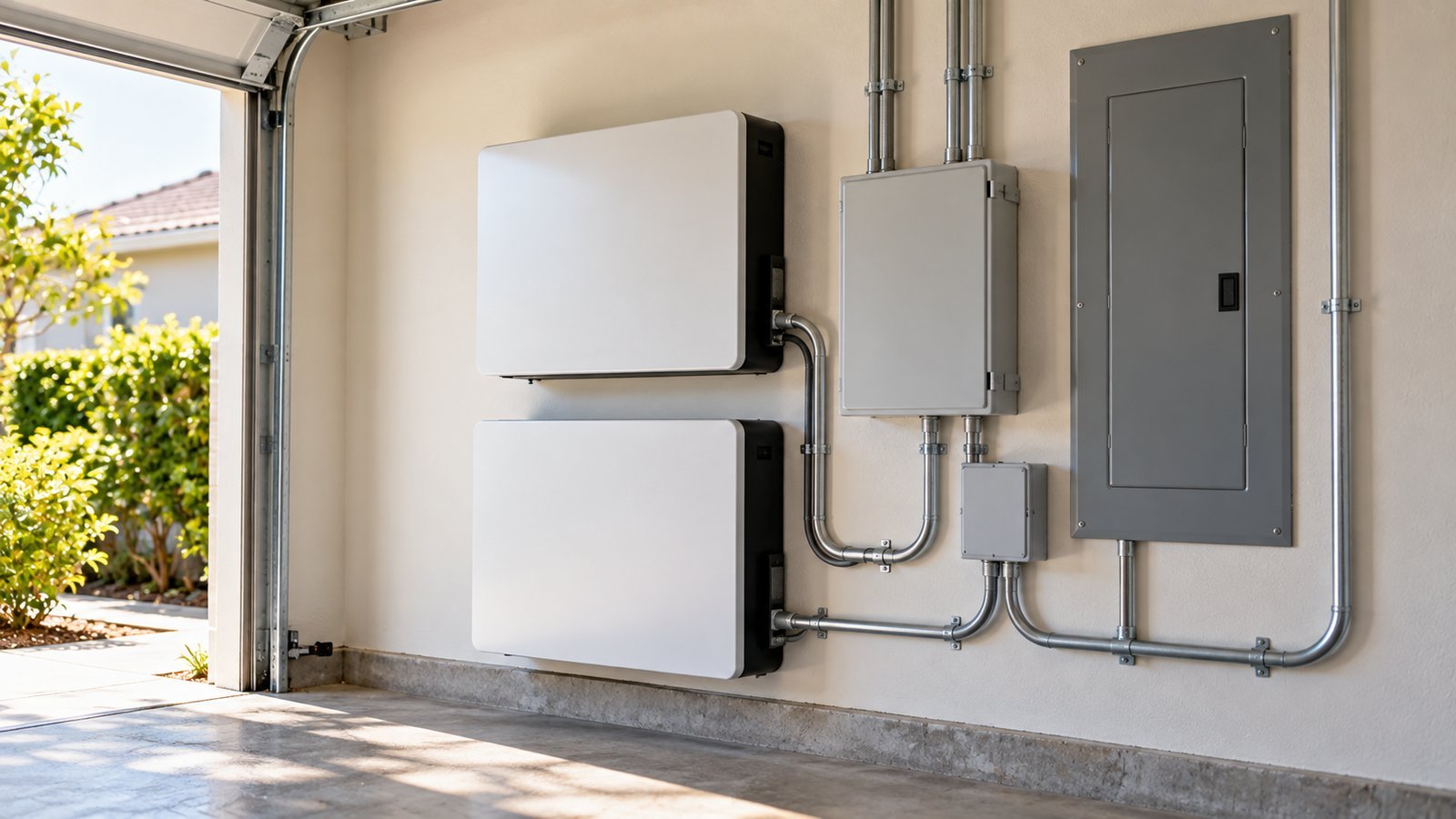
If the worksheet points past a portable power station, the same numbers carry over to permanent systems. The difference is that these are installed by professionals and connected to your home’s wiring.
Home battery backup
A home battery backup system is a wall- or floor-mounted battery, often using lithium iron phosphate (LiFePO4) cells, connected to the home’s electrical panel. It is sized two ways, just like your worksheet: storage in kilowatt-hours for how long it lasts, and continuous and peak output in kilowatts for what it can run at once. Many homeowners pair battery backup with rooftop solar so the battery can recharge during a long outage. Ask the installer which circuits the battery will cover and how much surge it can handle for motors such as a well pump or air conditioner.
Standby generators
A standby generator is permanently installed outside, usually on a concrete pad, and typically runs on natural gas from the utility line or on propane from a tank. It starts on its own when the power goes out and switches the home over through an automatic transfer switch. Standby generators are sized in kilowatts, so convert your highest combined running watts plus the largest surge into kilowatts when you talk with an installer. Like any engine, a standby generator produces carbon monoxide and must be installed with the clearances the manufacturer and local code require.
Inverter generators
Portable inverter generators sit between a power station and a full-size generator. They are usually quieter and can be more fuel-efficient at light loads than open-frame portable generators, and they produce cleaner power that suits electronics. They still burn fuel, so the CPSC’s rule applies: run them outdoors only, far from doors, windows and vents.
Transfer switches and load management
Any backup source connected to home circuits needs a transfer switch or approved interlock installed by a licensed electrician. It separates the home from the utility grid so power cannot flow back into the lines, which the CPSC warns can endanger utility workers. Load management devices go a step further: they automatically turn off large loads, such as an air conditioner or water heater, when the system is near its limit, then turn them back on when there is room. Load management can let a smaller battery or generator cover more of the house.
Solar generator recharge
A portable solar generator, meaning a power station paired with panels, can stretch any of these setups. Use the daily recharge estimate in our guide to solar generators to see how many watt-hours a set of panels might add back each day.

Ways to Shrink the Number
Lowering the load is often cheaper than buying a bigger system.
- Switch to LED lighting and headlamps
- Turn off the CPAP humidifier during an outage if your provider says it is acceptable, since heating uses far more power than the blower
- Keep the refrigerator closed and move drinks and frequently used items to a cooler with ice
- Charge phones from power banks over USB rather than through an inverter
- Turn off screens and devices that are not needed
- Use battery-powered radios instead of keeping a television on
Our guide to charging your phone without power lists several low-power ways to keep communication going.

Keep the Worksheet Current
Households change. A new medical device, a second freezer or a move to a building with an electric water pump all change the numbers. Review the worksheet once a year, ideally before hurricane or winter storm season, and check that batteries are charged and generators start. Store a printed copy with your emergency supplies so you can use it when the lights are off. Our guide on preparing for an outage in a high-rise adds building-specific items for apartment dwellers.

Frequently Asked Questions
How do I calculate watt-hours?
Multiply a device’s watts by the number of hours it runs. A 60-watt device running for 4 hours uses 240 watt-hours.
How many watt-hours does a refrigerator use per day?
It depends on the model, size, age and conditions. Divide the kilowatt-hours on the EnergyGuide label by 365 for a rough daily figure, or measure it with a plug-in usage meter for 24 hours.
What size power station do I need to run a CPAP overnight?
Multiply the CPAP’s power draw by the hours of use, then add a margin for losses. Check the manufacturer’s power figures with and without the humidifier, and ask your provider about outage plans.
What is the difference between running watts and surge watts?
Running watts are what a device uses steadily. Surge watts are the brief spike some motors and compressors draw when they start. An inverter or generator must handle both.
How do I convert mAh to watt-hours?
Multiply milliamp-hours by the battery’s voltage, usually about 3.6 to 3.7 volts for power banks, and divide by 1,000.
What size home battery backup do I need?
Total your essential loads in watt-hours per day, add a margin of about 20 to 25 percent, and convert to kilowatt-hours. Then check that the battery’s continuous and peak output in kilowatts can handle your largest combined load and the biggest motor start.
Can a battery backup run an air conditioner?
Some can, but air conditioners are among the largest loads in a home. Check the unit’s running and starting watts, and confirm with the installer that the battery’s output and capacity can support it for the hours you need.
Do I need a transfer switch for backup power?
Yes, if the backup source will power home circuits. A transfer switch or approved interlock, installed by a licensed electrician, keeps power from flowing back into utility lines. Devices plugged directly into a power station or a generator’s outlets do not need one.
Sources: Ready.gov (Power Outages), U.S. Consumer Product Safety Commission (Portable Generator Safety), Federal Trade Commission (EnergyGuide labels), U.S. Department of Energy (Estimating Appliance and Home Electronic Energy Use), manufacturers’ published specifications; Virginia Cooperative Extension, ENERGY SERIES: Estimating Appliance and Home Electronic Energy Use (publication 2901-9014, typical nameplate wattages; developed with the DOE Building Science Community of Practice). Figures in the worked example are illustrative round numbers, not measurements of any specific product.